What it is
A dashboard widget that breaks down your opportunities by where they came from. It now shows count and value for each status, and every number is clickable.
Drill into any number
Click any count under Total leads, Open, Won, Lost, or Abandoned to see the opportunities behind it.
Value for every status
See the dollar value for Open, Won, Lost, and Abandoned, not just the total.
Find leads with no source
Opportunities without a source show up in their own N/A row, so gaps in your data are easy to spot.
Who it's for
Any owner spending money on ads, directories, or lead services.
- Roofers & remodelers
- HVAC & plumbing
- Med spas
- Real estate teams
- Anyone paying for leads
Set it up in TraxionLab
Nothing to turn on. The report is already on your Dashboard.
Part 1 · Open the report
Log in at app.traxionlab.com, open your Dashboard, and find the Lead source report widget. Use the All pipelines menu to look at one pipeline.
Check in your account: If you do not see it on your Dashboard, email support@traxionlab.com. Dollar values only show for users with permission to view lead value.
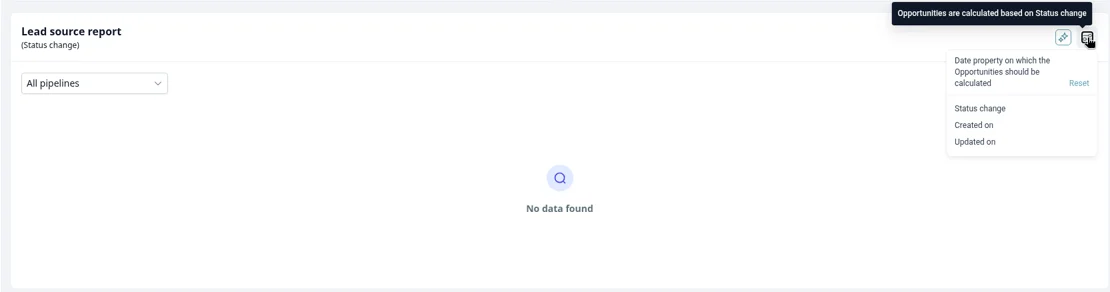
Click the filter icon on the widget to choose which date it uses: Status change, Created on, or Updated on.
Part 2 · Read it
Each source row shows the count and value for every status. Click any count above zero to open the list of opportunities behind it.
To check your data, look at the N/A row. Those are opportunities with no source set.
A real-world example
A roofer deciding where to spend next month
They pay for search ads and a lead service, and get plenty of referrals.
Compare
Won value by source shows referrals closing far more than the lead service.
Click
They click the lead service's Lost count and see most leads went cold after one call.
Fix
The N/A row shows 40 leads with no source, so they add a source field to their forms.
Tips from our team
- Set a source on every form and ad. The report is only as good as the source on each opportunity.
- Compare won value, not lead count. A source with fewer leads can still bring in more revenue.
- Check the N/A row monthly. It's a quick way to catch a form or integration that stopped tagging sources.
FAQ
Your quick win this month
Find your best lead source
Open the Lead source report and compare won value by source. Want help setting up sources on your forms? Book a short onboarding call.
Works best alongside
The Lead Source Report reads from your pipelines and opportunities.